sharp-sms使用指北

简介

sharp-sms 是基于阿里云的短信配置包依赖。

如何使用

添加 pom 依赖

<dependency>
    <groupId>com.rick.sms</groupId>
    <artifactId>sharp-sms</artifactId>
    <version>1.0-SNAPSHOT</version>
</dependency>

阿里云配置

application.yml

ali:
  access-key:
    id: LTAI4FkT323Aq4WU144WgZpwRA6D
    secret: U9eehrtFFsLt3SsP8E232TBhiyNh8Ghwvh

需要在阿里云的短信平台去获取

测试

@Autowired
private Sender sender;

@Test
public void testSend() {
    Map<String, String> params = new HashMap<>(3);
    params.put("name", "hello");
    params.put("value", "world");
    sender.send("18888888888", "XX公司", "SMS_202587654", params);
}

「XX公司」表示 签名,「SMS_202587654」表示 模版。 需要在阿里云的短信平台去配置。params参数就来自于 模版 中的变量。

sharp-common之JsonUtils

简介

Jackson是基于Java平台的一套数据处理工具,被称为”最好的Java Json解析器”。它可以使我们高效、简便的处理json字符串。

添加 pom 依赖

<dependency>
    <groupId>com.rick.common</groupId>
    <artifactId>sharp-common</artifactId>
    <version>1.0-SNAPSHOT</version>
</dependency>

对象转json字符串

public static String toJson(Object obj) throws IOException;
@Test
public void testToJson() throws IOException {
    Dept dept = new Dept();
    dept.setId(1L);
    dept.setName("Dev");
    dept.setParentId(2L);
    String json = JsonUtils.toJson(dept);
    System.out.println(json);
}

控制台输出

{"id":1,"name":"Dev","parentId":2}

json字符串转普通对象

public static <T> T toObject(String json, Class<T> clazz) throws IOException;

范型对象

@Test
public void testToPOJO() throws IOException {
    Dept dept = JsonUtils.toObject("{\"id\":1,\"name\":\"Dev\",\"parentId\":2}", Dept.class);
    Assert.assertEquals(1L, dept.getId().longValue());
}

Map对象

@Test
public void testToMap() throws IOException {
    Map dept = JsonUtils.toObject("{\"id\":1,\"name\":\"Dev\",\"parentId\":2}", Map.class);
    // dept.get("id") Integer类型
    Assert.assertEquals(1, dept.get("id"));
}

List对象

@Test
public void testToList() throws IOException {
    List list = JsonUtils.toObject("[{\"id\":1,\"name\":\"Dev\",\"parentId\":2}]", List.class);
    // dept.get("id") Integer类型
    Assert.assertEquals(1, ((Map)list.get(0)).get("id"));
}

json字符串转List

利用TypeReference,构造类型引用对象

@Test
public void testToListWithGenerics1() throws IOException {
    TypeReference<List<Dept>> typeRef = new TypeReference<List<Dept>>() {};
    List<Dept> list = JsonUtils.toObject("[{\"id\":1,\"name\":\"Dev\",\"parentId\":2}]", typeRef);
    Assert.assertEquals(1L, list.get(0).getId().longValue());
}

底层依赖利用JavaType实现

public static <T> List<T> toList(String json, Class<T> clazz) throws IOException;
@Test
public void testToListWithGenerics2() throws IOException {
    List<Dept> list = JsonUtils.toList("[{\"id\":1,\"name\":\"Dev\",\"parentId\":2}]", Dept.class);
    Assert.assertEquals(1L, list.get(0).getId().longValue());
}

json字符串转JsonNode

JsonNode后 ,操作对象比较转 Map List 对象更加的方便

public static JsonNode toJsonNode(String json) throws IOException;

list的Json字符串转JsonNode

@Test
public void testListStringToJsonNode() throws IOException {
    JsonNode jsonNode = JsonUtils.toJsonNode("[{\"id\":1,\"name\":\"Dev\",\"parentId\":2}]");
    Assert.assertEquals(1L, jsonNode.get(0).get("id").longValue());
}

对象的Json字符串转JsonNode

@Test
public void testObjectStringToJsonNode() throws IOException {
    JsonNode jsonNode = JsonUtils.toJsonNode("{\"id\":1,\"name\":\"Dev\",\"parentId\":2}");
    Assert.assertEquals(1L, jsonNode.get("id").longValue());
}

对象转JsonNode

@Test
public void testObjectToJsonNode() throws IOException {
    Dept dept = new Dept();
    dept.setId(1L);
    dept.setName("Dev");
    dept.setParentId(2L);
    JsonNode jsonNode = JsonUtils.toJsonNode(dept);
    Assert.assertEquals(1L, jsonNode.get("id").longValue());
}

Map转JsonNode

@Test
public void testMapToJsonNode() {
    String id = "1";
    Map<String, String> params = new HashMap<>();
    params.put("id", id);
    JsonNode jsonNode = JsonUtils.toJsonNode(params);
    Assert.assertEquals(1L, jsonNode.get("id").asLong());
}

sharp-meta操作指北

添加依赖

<dependency>
    <groupId>com.rick.meta</groupId>
    <artifactId>sharp-meta</artifactId>
    <version>1.0-SNAPSHOT</version>
</dependency>

创建脚本

create table sys_dict
(
type varchar(32) not null,
name varchar(32) not null,
label varchar(32) not null,
sort int null,
primary key (type, name)
)
charset=utf8mb4;

create table sys_property
(
name varchar(32) not null
primary key,
value varchar(255) not null
)
charset=utf8mb4;

INSERT INTO sys_dict (type, name, label, sort) VALUES ('sex', 'F', '女', 1);
INSERT INTO sys_dict (type, name, label, sort) VALUES ('sex', 'M', '男', 0);

INSERT INTO project_demo.sys_property (name, value) VALUES ('hello', 'world');

读取配置文件

application-dict.yml

dict:
  items:
    - type: user
      sql: "select username, name from sys_user order by id asc"
    - type: grade
      map: {g1: "一年级", g2: "二年级"}

创建测试

@RunWith(SpringRunner.class)
@SpringBootTest
public class MetaTest {

    @Autowired
    private DictService dictService;

    @Autowired
    private PropertyService propertyService;

    @Test
    public void testList() {
        List<DictDO> sexList = dictService.getDictByType("sex");
        Assert.assertEquals(2, sexList.size());
    }

    @Test
    public void testGetOne() {
        DictDO dictDO = dictService.getDictByTypeAndName("sex", "F").get();
        Assert.assertEquals("女", dictDO.getLabel());
    }

    @Test
    public void testDictYml() {
        Assert.assertEquals(2, dictService.getDictByType("grade").size());
        Assert.assertEquals("一年级",dictService.getDictByTypeAndName("grade", "g1").get().getLabel());
        Assert.assertEquals("Rick",dictService.getDictByTypeAndName("user", "jkxyx205").get().getLabel());
        Assert.assertEquals("男",dictService.getDictByTypeAndName("sex", "M").get().getLabel());
    }

    @Test
    public void testGetProperty() {
        String property = propertyService.getProperty("hello");
        Assert.assertEquals("world", property);
    }

    @Test
    public void testSetProperty() {
        propertyService.setProperty("gg", "dd");
    }
}

sharp-excel使用指北:高级部分(二)

简介

sharp-excel 是一个操作Excel、Word工具的java实现。依赖apache的 POI。目前只开发了Excel的部分,Word部分还没有实现。
pom.xml

<dependency>
    <groupId>com.rick.office</groupId>
    <artifactId>sharp-excel</artifactId>
    <version>1.0-SNAPSHOT</version>
    <scope>compile</scope>
</dependency>

设计的理念是定(x, y)坐标,然后写数据

方法测试

在指定的坐标位置,写入数据

单元格数据

@Test
public void testCell() throws IOException {
    File file = new File("/Users/rick/Documents/3.xlsx");

    ExcelWriter excelWriter = new ExcelWriter();

    excelWriter.writeCell(new ExcelCell(4, 5, "hello"));

    excelWriter.toFile(new FileOutputStream(file));
}

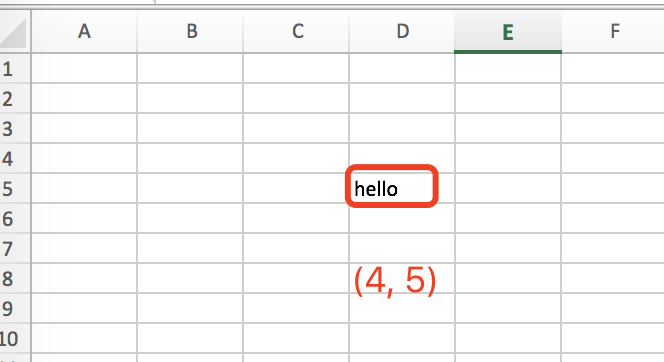
在坐标(4, 5)的单元格写入「hello」
http://xhope.top/wp-content/uploads/2021/09/0.png

行数据

@Test
public void writeRow() throws IOException {
    File file = new File("/Users/rick/Documents/9.xlsx");
    ExcelWriter excelWriter = new ExcelWriter();
    excelWriter.writeRow(new ExcelRow(2,2, new Object[] {1, 2, 3, 4, 5, "hello", true}));
    excelWriter.toFile(new FileOutputStream(file));
}

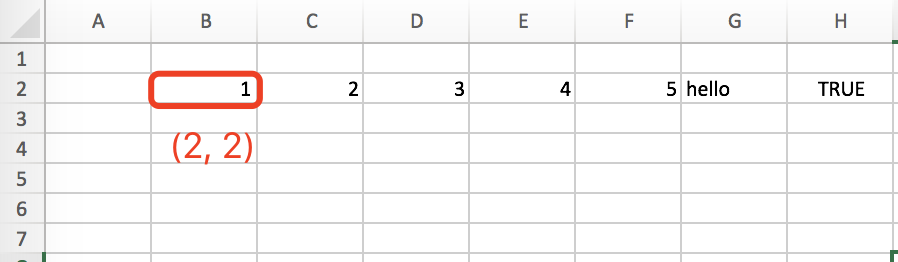
从坐标是(2, 2) 的位置开始,写入「一行」数据:1, 2, 3, 4, 5, “hello”, true
http://xhope.top/wp-content/uploads/2021/09/2.png

列数据

@Test
public void writeColumn() throws IOException {
    File file = new File("/Users/rick/Documents/8.xlsx");
    ExcelWriter excelWriter = new ExcelWriter();
    excelWriter.writeColumn(new ExcelColumn(2,2, new Object[] {1, 2, 3, 4, 5, "hello", true}));
    excelWriter.toFile(new FileOutputStream(file));
}

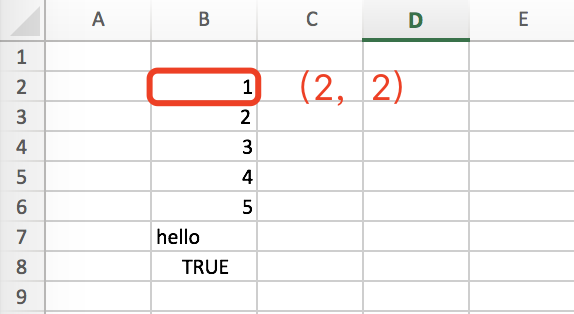
从坐标是(2, 2) 的位置开始,写入「一列」数据:1, 2, 3, 4, 5, “hello”, true
http://xhope.top/wp-content/uploads/2021/09/1.png

合并单元格

@Test
public void testWriteMerge() throws IOException {
    File file = new File("/Users/rick/Documents/0.xlsx");

    ExcelWriter excelWriter = new ExcelWriter();

    ExcelCell cell = new ExcelCell(2, 3, "hello");

    cell.setRowSpan(3);
    cell.setColSpan(2);

    excelWriter.writeCell(cell);

    excelWriter.toFile(new FileOutputStream(file));
}

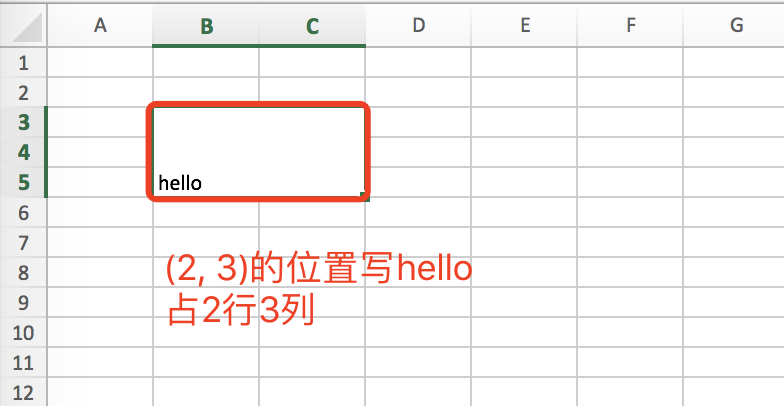
在坐标(2, 3)的单元格写入「hello」,占3行2列
http://xhope.top/wp-content/uploads/2021/09/merge.png

设置样式

单元格

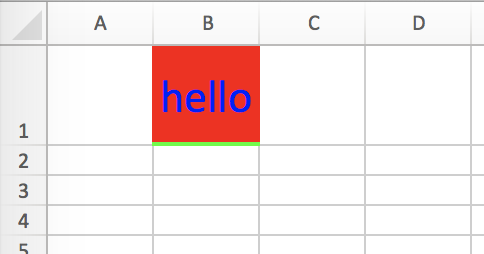
@Test
public void testWriteCellWithStyle() throws IOException {
    File file = new File("/Users/rick/Documents/3.xlsx");

    ExcelWriter excelWriter = new ExcelWriter();

    ExcelCell cell = new ExcelCell(2,1, "hello");

    cell.setHeightInPoints(50f);
    cell.setStyle(createStyle(excelWriter.getBook()));

    excelWriter.writeCell(cell);

    excelWriter.toFile(new FileOutputStream(file));
}
http://xhope.top/wp-content/uploads/2021/09/s1.png

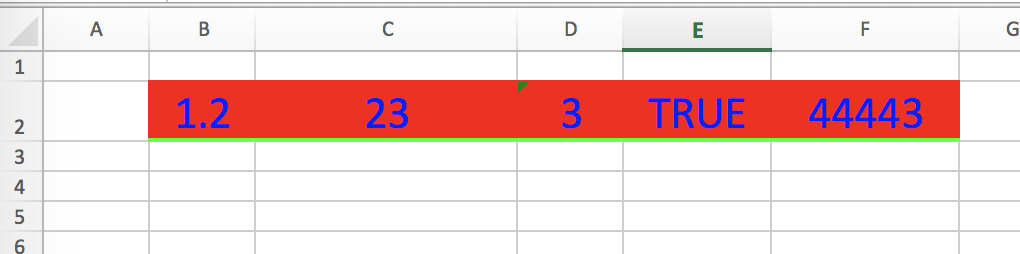
@Test
public void testWriteRowWithStyle() throws IOException {
    File file = new File("/Users/rick/Documents/3.xlsx");

    ExcelWriter excelWriter = new ExcelWriter();

    excelWriter.getActiveSheet().setColumnWidth(2, 5600);

    ExcelRow row = new ExcelRow(2,2, new Object[] {1.2d, 23, "3", true, LocalDate.now()});
    row.setStyle(createStyle(excelWriter.getBook()));
    excelWriter.writeRow(row);

    excelWriter.toFile(new FileOutputStream(file));
}
http://xhope.top/wp-content/uploads/2021/09/s2.png

同行设置

复杂例子

@Test
public void testComplex() throws IOException {
    File file = new File("/Users/rick/Documents/7.xlsx");
    ExcelWriter excelWriter = new ExcelWriter();

    ExcelCell cell1 = new ExcelCell(1,1, "国内仓");
    cell1.setColSpan(3);
    cell1.setStyle(createStyle(excelWriter.getBook()));

    ExcelCell cell2 = new ExcelCell(4,1, "香港仓");
    cell2.setRowSpan(2);
    cell2.setStyle(createStyle(excelWriter.getBook()));

    ExcelCell cell3 = new ExcelCell(5,1, "香港直运仓");
    cell3.setRowSpan(2);
    cell3.setStyle(createStyle(excelWriter.getBook()));

    ExcelCell cell4 = new ExcelCell(6,1, "供应链未完成数量");
    cell4.setRowSpan(2);
    cell4.setStyle(createStyle(excelWriter.getBook()));

    ExcelRow row1 = new ExcelRow(1, 2, new Object[] {"苏州成品仓", "苏州样品仓", "深圳成品仓"});
    row1.setStyle(createStyle(excelWriter.getBook()));

    ExcelRow row2 = new ExcelRow(1, 3, new Object[] {"50", "0", "1"});
    row2.setStyle(createStyle(excelWriter.getBook()));

    ExcelCell cell5 = new ExcelCell(1,4, "国内仓锁货数量");
    cell5.setColSpan(3);
    cell5.setStyle(createStyle(excelWriter.getBook()));

    ExcelCell cell6 = new ExcelCell(1,5, "9");
    cell6.setColSpan(3);
    cell6.setStyle(createStyle(excelWriter.getBook()));

    ExcelCell cell7 = new ExcelCell(4,3, "29");
    cell7.setRowSpan(3);
    cell7.setStyle(createStyle(excelWriter.getBook()));

    ExcelCell cell8 = new ExcelCell(5,3, "39");
    cell8.setRowSpan(3);
    cell8.setStyle(createStyle(excelWriter.getBook()));

    ExcelCell cell9 = new ExcelCell(6,3, 88);
    cell9.setRowSpan(3);
    cell9.setStyle(createStyle(excelWriter.getBook()));

    ExcelColumn column = new ExcelColumn(7, 1, new Object[] {"新增", "2", "23", 23, 34.2f});
    column.setStyle(createStyle(excelWriter.getBook()));

    excelWriter.writeCell(cell1);
    excelWriter.writeCell(cell2);
    excelWriter.writeCell(cell3);
    excelWriter.writeCell(cell4);
    excelWriter.writeCell(cell5);
    excelWriter.writeCell(cell6);
    excelWriter.writeCell(cell7);
    excelWriter.writeCell(cell8);
    excelWriter.writeCell(cell9);
    excelWriter.writeRow(row1);
    excelWriter.writeRow(row2);
    excelWriter.writeColumn(column);

    excelWriter.getActiveSheet().setColumnWidth(0, 5600);
    excelWriter.getActiveSheet().setColumnWidth(1, 5600);
    excelWriter.getActiveSheet().setColumnWidth(2, 5600);
    excelWriter.getActiveSheet().setColumnWidth(3, 5600);
    excelWriter.getActiveSheet().setColumnWidth(4, 5600);
    excelWriter.getActiveSheet().setColumnWidth(5, 5600);
    excelWriter.getActiveSheet().setColumnWidth(6, 5600);

    excelWriter.toFile(new FileOutputStream(file));

}

private XSSFCellStyle createStyle(XSSFWorkbook book) {

    XSSFCellStyle cellStyle = book.createCellStyle();
    // 定义颜色
    XSSFColor color = new XSSFColor(Color.black, new DefaultIndexedColorMap());

    // 设置边框(合并这个不生效) 需要单独在CellRangeAddress设置
    cellStyle.setBorderLeft(BorderStyle.THIN);
    cellStyle.setBorderRight(BorderStyle.THIN);
    cellStyle.setBorderTop(BorderStyle.THIN);
    cellStyle.setBorderBottom(BorderStyle.THIN);

    cellStyle.setBorderColor(XSSFCellBorder.BorderSide.LEFT, color);
    cellStyle.setBorderColor(XSSFCellBorder.BorderSide.RIGHT, color);
    cellStyle.setBorderColor(XSSFCellBorder.BorderSide.TOP, color);
    cellStyle.setBorderColor(XSSFCellBorder.BorderSide.BOTTOM, color);

    // 水平居中
    cellStyle.setAlignment(HorizontalAlignment.CENTER);
    // 垂直居中
    cellStyle.setVerticalAlignment(VerticalAlignment.CENTER);

    return cellStyle;
}

http://xhope.top/wp-content/uploads/2021/09/complex.png

POI原生实现例子

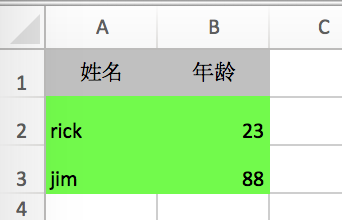
@Test
public void testNative() throws IOException {
    File file = new File("/Users/rick/Documents/2.xlsx");

    XSSFWorkbook book = new XSSFWorkbook();
    XSSFSheet sheet = book.createSheet("sheet-rick");

    // 设置第一列的框
    sheet.setColumnWidth(0, 3766);

    XSSFRow row = sheet.createRow(0);


    // 设置高度
    row.setHeightInPoints(24);
//        row.setRowStyle();
    XSSFCell cell = row.createCell(1);
    cell.setCellValue("hello");
//        cell.setCellStyle();


    XSSFCellStyle cellStyle = book.createCellStyle();

    // 定义颜色
    XSSFColor color = new XSSFColor(java.awt.Color.BLUE, new DefaultIndexedColorMap());
    XSSFColor color2 = new XSSFColor(Color.RED, new DefaultIndexedColorMap());
    XSSFColor color3 = new XSSFColor(Color.GREEN, new DefaultIndexedColorMap());

    // 填充色
    cellStyle.setFillForegroundColor(color2);
    cellStyle.setFillPattern(FillPatternType.SOLID_FOREGROUND);

    // 文字色
    XSSFFont font = book.createFont();
    font.setColor(color);
    cellStyle.setFont(font);

    // 设置边框(合并这个不生效) 需要单独在CellRangeAddress设置
//        cellStyle.setBorderBottom(BorderStyle.MEDIUM);
//        cellStyle.setBorderColor(XSSFCellBorder.BorderSide.BOTTOM, color3);

    // 水平居中
    cellStyle.setAlignment(HorizontalAlignment.CENTER);
    // 垂直居中
    cellStyle.setVerticalAlignment(VerticalAlignment.CENTER);

    // 设置样式
    cell.setCellStyle(cellStyle);

    // 合并单元格
    CellRangeAddress region = new CellRangeAddress(0, 1, 1, 2);
    sheet.addMergedRegion(region);

    //
    System.out.println(cellStyle.getBorderBottom() == BorderStyle.NONE);
    setRegionStyle(sheet, region);

    book.write(new FileOutputStream(file));
    book.close();

}

/**
 * 设置边框
 //  * @param region
 */
 private void setRegionStyle(XSSFSheet sheet, CellRangeAddress region) {
    //全部完成之后
    XSSFRow xrow = (XSSFRow) CellUtil.getRow(region.getFirstRow(), sheet);
    XSSFCell xccell = (XSSFCell) CellUtil.getCell(xrow, region.getFirstColumn());

    XSSFCellStyle style = xccell.getCellStyle();

    for (int i = region.getFirstRow(); i <= region.getLastRow(); i++) {
        XSSFRow row = (XSSFRow) CellUtil.getRow(i, sheet);
        for (int j = region.getFirstColumn(); j <= region.getLastColumn(); j++) {
            XSSFCell cell = (XSSFCell) CellUtil.getCell(row, j);
            cell.setCellStyle(style);
            System.out.println("-----");
        }
    }
 }

sharp-excel使用指北:基础使用(一)

简介

sharp-excel 是一个操作Excel、Word工具的java实现。依赖apache的 POI。目前只开发了Excel的部分,Word部分还没有实现。
pom.xml

<dependency>
    <groupId>com.rick.office</groupId>
    <artifactId>sharp-excel</artifactId>
    <version>1.0-SNAPSHOT</version>
    <scope>compile</scope>
</dependency>

方法测试

Excel读取

@Test
public void testRead() throws Exception {
    File file = new File("/Users/rick/Documents/1.xlsx");

    ExcelReader.readExcelContent(new FileInputStream(file), (index, data, sheetIndex, sheetName) -> {
        System.out.print("index: " + index + ", ");
        for (Object d : data) {
            System.out.print(d + ", ");
        }
        System.out.println();

        return true;
    });
}

控制台输出

index: 0, 姓名, 年龄,
index: 1, rick, 23.0,
index: 2, jim, 88.0,

Excel写入

基本使用:分别构建

分别构建「表头」和「数据」,两者没有关联

@Test
public void testBase() throws IOException {
    File file = new File("/Users/rick/Documents/11.xlsx");
    TableColumn column1 = new TableColumn("姓名");
    TableColumn column2 = new TableColumn("年龄");

    List<TableColumn> columnList = Lists.newArrayList(column1, column2);
    List<Object[]> rows = Lists.newArrayList(new Object[]{"rick", 23}, new Object[] {"jim", 88});
    GeneralExportTable excelTable =  new GeneralExportTable(columnList, rows);

    excelTable.write(new FileOutputStream(file));
}

基本使用:Map构建数据

分别构建「表头」和「数据」,两者通过key关联

@Test
public void testBaseMap() throws IOException {
    File file = new File("/Users/rick/Documents/2.xlsx");

    MapTableColumn column1 = new MapTableColumn("name", "姓名");
    MapTableColumn column2 = new MapTableColumn("age", "年龄");
    List<MapTableColumn> columnList = Lists.newArrayList(column1, column2);

    Map<String, Object> map1 = Maps.newHashMapWithExpectedSize(2);
    map1.put("name", "rick");
    map1.put("age", 12);

    Map<String, Object> map2 = Maps.newHashMapWithExpectedSize(2);
    map2.put("name", "jim");
    map2.put("age", 88);

    List<Map<String, Object>> rows = Lists.newArrayList(map1, map2);
    MapExcelTable excelTable =  new MapExcelTable(columnList, rows);

    excelTable.write(new FileOutputStream(file));
    }

基本使用+设置数据单元格样式

构建表头和数据

@Test
public void testBaseWithStyle() throws IOException {
    File file = new File("/Users/rick/Documents/22.xlsx");

    TableColumn column1 = new TableColumn("姓名");
    TableColumn column2 = new TableColumn("年龄");

    List<TableColumn> columnList = Lists.newArrayList(column1, column2);
    List<Object[]> rows = Lists.newArrayList(new Object[]{"rick", 23}, new Object[] {"jim", 88});

    GeneralExportTable excelTable =  new GeneralExportTable(columnList, rows);

    XSSFCellStyle cellStyle = excelTable.getExcelWriter().getBook().createCellStyle();
    // 填充色
    XSSFColor color = new XSSFColor(Color.GREEN, new DefaultIndexedColorMap());
    cellStyle.setFillForegroundColor(color);
    cellStyle.setFillPattern(FillPatternType.SOLID_FOREGROUND);
    // 数据部分样式
    excelTable.setRowStyle(cellStyle);

    // 表头部分样式
//         excelTable.setColumnStyle(cellStyle);

    excelTable.write(new FileOutputStream(file));
}

http://xhope.top/wp-content/uploads/2021/09/ss.png

  • setColumnStyle 表头部分样式
  • setRowStyle 数据部分样式

HTML中table解析导出

解析table标签,然后导出

@Test
public void testHtmlExport() throws IOException {
    HtmlExcelTable excelTable = new HtmlExcelTable();

    excelTable.getExcelWriter().getActiveSheet().setColumnWidth(0, 8000);

    excelTable.write("<table class=\"table table-responsive-sm table-bordered table-sm table-stock\">\n" +
            "                <tbody>\n" +
            "                    <tr>\n" +
            "                        <th colspan=\"4\">国内仓</th>\n" +
            "                        <th rowspan=\"2\">香港仓</th>\n" +
            "                        <th rowspan=\"2\">香港直运仓</th>\n" +
            "                        <th rowspan=\"2\">供应链未完成数量</th>\n" +
            "                    </tr>\n" +
            "                    <tr>\n" +
            "                        <th>深圳成品仓</th>\n" +
            "                        <th>苏州成品仓</th>\n" +
            "                        <th>深圳待处理仓</th>\n" +
            "                        <th>苏州样品仓</th>\n" +
            "                    </tr>\n" +
            "                    <tr>\n" +
            "                        <td>13,558</td>\n" +
            "                        <td>0</td>\n" +
            "                        <td>18</td>\n" +
            "                        <td>0</td>\n" +
            "                        <td rowspan=\"3\">0</td>\n" +
            "                        <td rowspan=\"3\">0</td>\n" +
            "                        <td rowspan=\"3\">\n" +
            "                            <a href=\"javascript:;\" id=\"otherDetailBtn\">1,000,500</a>\n" +
            "                            \n" +
            "                        </td>\n" +
            "                    </tr>\n" +
            "                    <tr>\n" +
            "                        <th colspan=\"4\">国内仓锁货数量</th>\n" +
            "                    </tr>\n" +
            "                    <tr>\n" +
            "                        <td colspan=\"4\">\n" +
            "                            <a href=\"javascript:;\" id=\"reserveDetailBtn\">12,000</a>\n" +
            "                            \n" +
            "                        </td>\n" +
            "                    </tr>\n" +
            "                </tbody>\n" +
            "            </table>", new FileOutputStream(new File("/Users/rick/Documents/a.xlsx")));
}

http://xhope.top/wp-content/uploads/2021/09/htm.png

集成GridService导出

在Spring上下文中,通过 ExportUtils,集成 GridService 获取数据源,导出Excel。
提供了方便的导出操作。只需要根据查询SQL,直接导出excel文件。

pom.xml 添加依赖

<dependency>
    <groupId>com.rick.db</groupId>
    <artifactId>sharp-excel</artifactId>
    <version>1.0-SNAPSHOT</version>
</dependency>
public static final void export(String sql, Map<String, ?> params, OutputStream outputStream, List<MapTableColumn> columnList)

测试代码

/**
 * 查询sql导出
 */
@Test
public void testSqlExport() throws IOException {
    Map params = new HashMap<>();
    // 业务参数
    params.put("title", "version");

    ExportUtils.export("SELECT id, title FROM t_demo WHERE title like :title", params,
            new FileOutputStream("/Users/rick/Downloads/export/t_demo.xlsx"),
            Lists.newArrayList(
                    new MapTableColumn("title", "标题") // 导出文件中第一列为标题,且仅导出标题,忽略id
//                        new MapTableColumn("id", "ID")
            ));
}