Compass模块使用

学习Sass,就是学习语法,学习Compass就是在用库的。使用compass,就是在使用compass给我们提供的库:variables,mixins,functions。
犹如JavaScript之于jQuery

Compass介绍

compass有以下模块:

  • Browser Support

    设置对浏览器的支持情况,$supported-browsers列出所有你想支持的浏览器,$browser-minimum-versions,支持浏览器的最低版本。

  • CSS3

封装了CSS3的mixin。主要子模块有:Appearance、Background Clip、Background Origin、Background Size、Border Radius、Box、Box Shadow、Box Sizing、CSS 、Regions、CSS3 Pie、Columns、Filter、Flexbox、Font Face、Hyphenation、Images
、Inline Block、Opacity、Selection、Shared Utilities、Text Shadow、Transform
、Transition、User Interface

  • Helpers
    函数库

  • Layout
    布局相关的

  • Reset
    样式重置

@import "compass/reset";

这样所有的样式都被重置了,等价引用

@import "compass/reset/utilities";
global-reset();

作为一个有极客精神的人,如果不想重置所有样式,按需重置,怎么处理?
通过mixin函数就可以做到。

@import "compass/reset/utilities";
nested-reset();
reset-box-model();
reset-table();
reset-html5();
...
  • Typography
    文本布局相关,Links链接样式;Lists列表样式;Text 文字显示;
    Vertical Rhythm 设置行高;
  • Utilities
    其他mixin

Compass插件normalize使用

1 . 安装插件

gem install compass-normalize

2 . 使用插件

  • config.rb添加引用
require 'compass-normailze'
  • css文件调用

a. 重置所有样式

@import "normalize"; //重置所有样式

b. 按需重置

@import "normalize-version";
@import "normalize/base";
@import "normalize/html5";
@import "normalize/links";

参照网站:
http://xhope.top/?p=893
http://compass-style.org/reference/compass/
sass语法,compass命令使用

省略sass/compass安装的过程^_^

sass

1. 常用命令

sass main.scss //打印到控制台

sass main.scss main.css //输出到main.css中

sass-convert main.scss main.sass// scss sass相互转化

2. 中文编译问题

sass文件中,代码若有中文编译Sass 文件出现Syntax error: Invalid GBK character报错,需要修改ruby对中文的支持。

  • 找到ruby的安装目录,里面也有sass模块,找到文件engine.rb。如这个路径:C:\Ruby23-x64\lib\ruby\gems\2.3.0\gems\sass-3.4.22\lib\sass\engine.rb(用everything搜索engine.rb)

  • 在这个文件里面engine.rb,添加一行代码:
    Encoding.default_external = Encoding.find(‘utf-8’)
    放在所有的require XXXX 之后即可。

3. sass语法

1.文件导入

sass文件名规则,文件名_variables.scss
导入的时候只需要这么写:

import 'variables'

可以看到不需要下划线和后缀,sass编译器认为variables == _variables.scss

2. 变量

变量的声明:

    $baseSize:62.5%;
    $baseColor: #f0f;

变量的使用

html {
    font-size: $baseSize;
    color: $baseColor;
}

3. mixin

mixin声明

@mixin col-6 {
    width: 50%;
    float: left;
}


@mixin col($width: 40%) {
    width: $width;
    float: left;
}

@mixin col-sm($width: 50%) {
    @media (min-width: 768px) {
        width: $width;
        float: left;
    }
}

mixin使用

div.content {
   /*@include col-6();*/
   //@include col(); //无参数括号可以省略
   @include col-sm();

   &:hover {
        background-color:#f5f5f5;
   };

    @at-root //编译后寻址路径不再是:div.content .content-title{}
   .content-title {
        color: #0f0;
        font-size: 2em;
   }
}

4. extend

extend使用

//编译到css中
/* .error { 
    color: red;
} */

//不会编译到css中
%error {
    color: red;
}

.serious-error {
    @extend %error;

    border: 1px solid red;
}

compass

1. 文件配置config.rb

require 'compass/import-once/activate'
# Require any additional compass plugins here.

# Set this to the root of your project when deployed:
http_path = "/"
css_dir = "stylesheets"
sass_dir = "sass"
images_dir = "images"
javascripts_dir = "javascripts"

2. compass常用命令

compass create myproject //创建compass项目

compass compile //编译

compass watch //监听文件修改,及时编译,需要配置文件

参考资料
http://www.ruanyifeng.com/blog/2012/06/sass.html
http://www.ruanyifeng.com/blog/2012/11/compass.html

http://www.imooc.com/learn/371
http://www.imooc.com/learn/364

vue-cli模板文件使用scss的坑

我们知道.vue文件使用sass的方式有如下几种方式

  1. 使用内联style
<style lang="scss">
</style>
  1. 使用外部文件scss
<style lang="scss">
  @import './styles/main.scss
</style>
<style src="./styles/main.scss"></style>

如果我想要在模板页中使用scss中,不是在组件.vue文件该如何使用呢?

其实很简单,只需要在入口js文件中导入scss文件即可。
main.js

require('../static/scss/portal.scss')

不要做如下操作:不要

在文件webpack.base.conf.js, 添加如下代码

 {
   test: /\.scss$/,
    loader: 'style!css!scss',
    include: projectRoot,
    exclude: /node_modules/
  },

这样会一直报错

ERROR in ./src/news.js
Module not found: Error: Cannot resolve module 'scss' in D:\yodean\workspace\meb\src
 @ ./src/main.js 3:0-37

原因是:vue对CSS, SASS/SCSS, Stylus.做了加载配置。查看projectRoot/build/utils.js

stackoverflow:
http://stackoverflow.com/questions/37031123/why-am-i-not-being-able-to-compile-sass-with-webpack

Yeoman搭建angular的坑:Uncaught ReferenceError: angular is not defined(…)

1. 问题

今天用yeoman搭建angular环境,搭建完成之后,执行操作:

gulp serve

页面老是报错:Uncaught ReferenceError: angular is not defined(…)

2. 操作步骤

npm install -g generator-angular
yo angular angular-in-action
cnpm install && bower install

这个时候执行gulp serve就会出现文章一开始说的问题。

打开index.html,可以如下代码,注意不能删除,这样页面才在哪放置 inject 数据流

  <!-- build:js(.) scripts/vendor.js -->
    <!-- bower:js -->
    <!-- endbower -->
    <!-- endbuild -->   

3. 解决方法

3.1 为taskserve添加bower任务

gulp.task('serve', function (cb) {
  runSequence('clean:tmp',
    ['lint:scripts'],
    ['start:client'],
    ['bower'], //添加bower
    'watch', cb);
});

3.2 修改bower输出路径

// inject bower components
gulp.task('bower', function () {
  return gulp.src(paths.views.main)
    .pipe(wiredep({
      directory: yeoman.app + '/bower_components',
      ignorePath: '..'
    }))
  .pipe(gulp.dest(yeoman.app)); //修改输出路径
});

3.3 拷贝bower_componentsapp目录下

重新执行

gulp serve

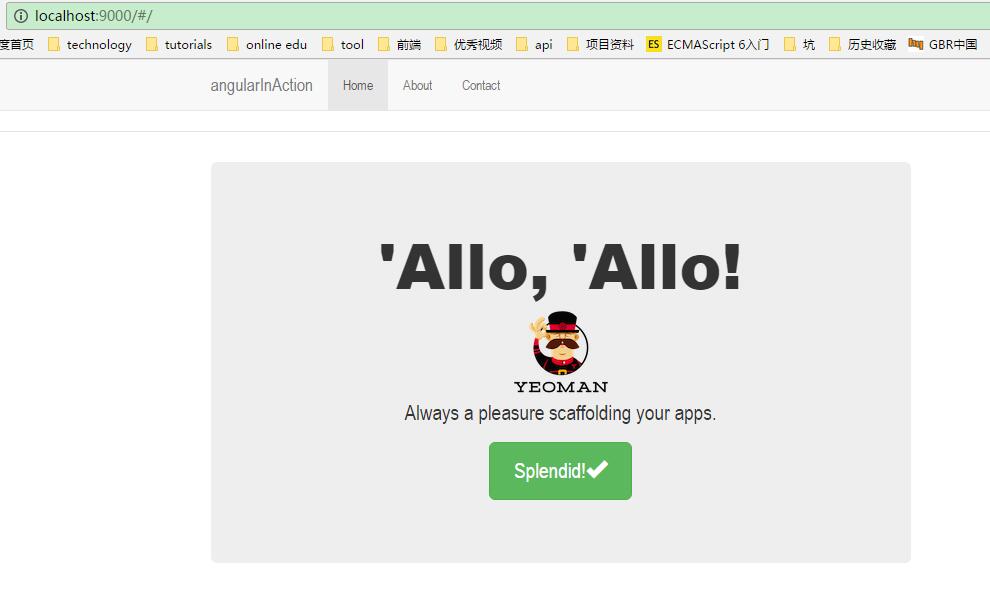
http://xhope.top/wp-content/uploads/2016/11/12.jpg
完成

issue:
https://github.com/yeoman/generator-angular/issues/1295
https://github.com/yeoman/generator-angular/issues/1299

yeoman创建webapp

1 . 全局安装yeoman

npm install -g yo

2 . 全局安装bower

npm install -g bower

3 . install 基本的项目模板(generator)

$ npm install generator-webapp -g

4 . 创建项目

yo webapp my-project
cnpm install & bower install

5 .gulp执行项目

gulp serve