Spring Security表单认证流程分析(四)

Spring Security过滤器

HttpSecurity.java#performBuild 获取 DefaultSecurityFilterChain
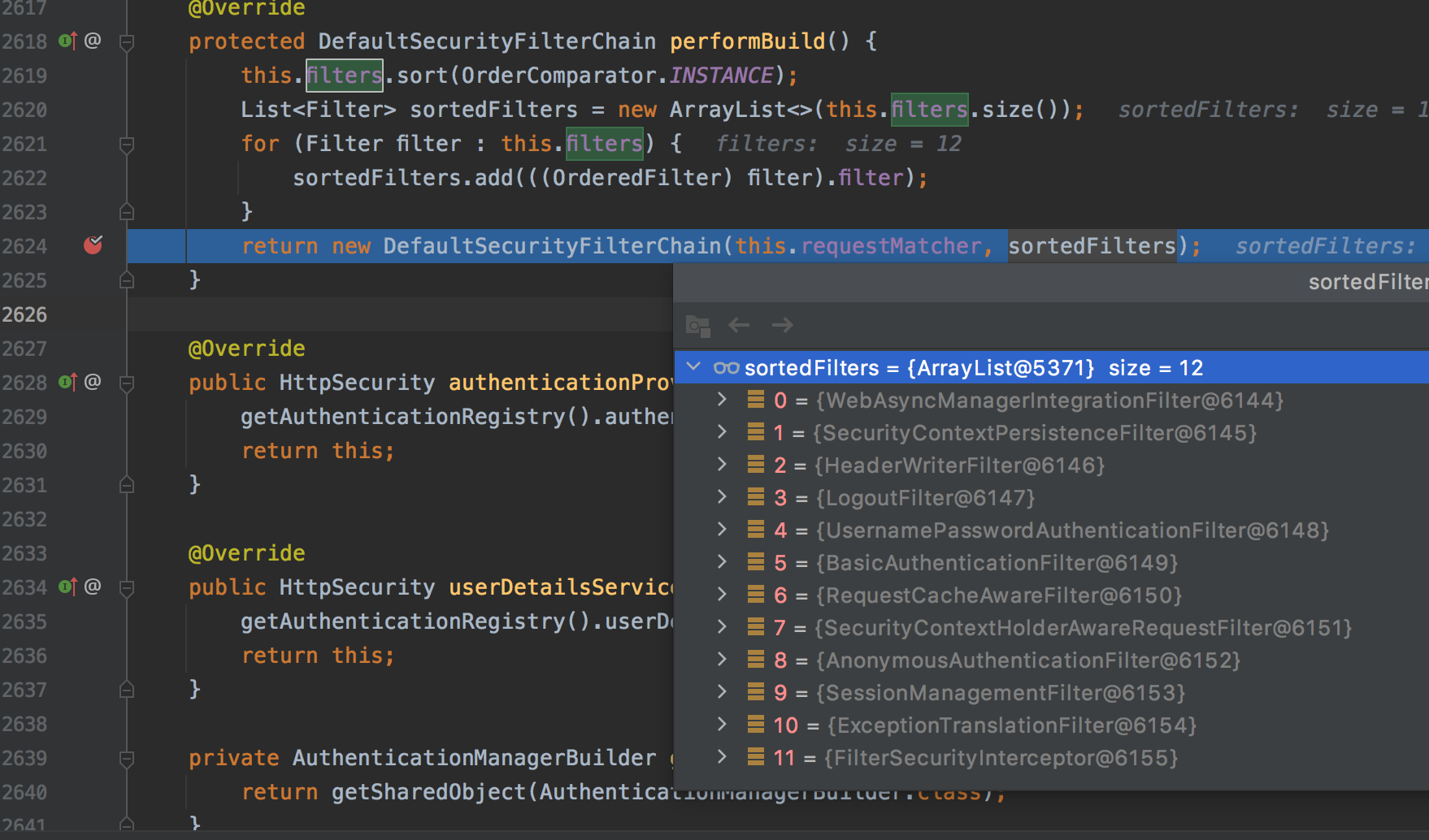
http://xhope.top/wp-content/uploads/2021/10/s1.png

0 = {WebAsyncManagerIntegrationFilter@5192}
这个过滤器用于集成SecurityContext到Spring异步执行机制的WebAsyncManager 中。如果想要与spring集成,就必须要使用此过滤器链。

1 = {SecurityContextPersistenceFilter@6142} 
主要是使用SecurityContextRepository在session中保存或更新一个SecurityContext域对象(相当于一个容器),并将SecurityContext给以后的过滤器使用,来为后续filter建立所需的上下文。SecurityContext中存储了当前用户的认证以及权限信息。 其他的过滤器都需要依赖于它。在 Spring Security 中,虽然安全上下文信息被存储于 Session 中,但我们在实际使用中不应该直接操作 Session,而应当使用 SecurityContextHolder。

2 = {HeaderWriterFilter@6125} 
用于将头信息加入响应中。

3 = {LogoutFilter@6163}
匹配URL为/logout的请求,实现用户退出,清除认证信息。

4 = {UsernamePasswordAuthenticationFilter@6199}
认证操作全靠这个过滤器,默认匹配URL为/login且必须为POST请求。

5 = {BasicAuthenticationFilter@6250} 
此过滤器会自动解析HTTP请求中头部名字为Authentication,且以Basic开头的头信息。

6 = {RequestCacheAwareFilter@6146} 
通过HttpSessionRequestCache内部维护了一个RequestCache,用于缓存HttpServletRequest。

7 = {SecurityContextHolderAwareRequestFilter@6156}
针对ServletRequest进行了一次包装,使得request具有更加丰富的API。

8 = {AnonymousAuthenticationFilter@6150} 
当SecurityContextHolder中认证信息为空,则会创建一个匿名用户存入到SecurityContextHolder中。
spring security为了兼容未登录的访问,也走了一套认证流程,只不过是一个匿名的身份(游客)

9 = {SessionManagementFilter@6137} 
SecurityContextRepository限制同一用户开启多个会话的数量

10 = {ExceptionTranslationFilter@6113} 
异常转换过滤器位于整个springSecurityFilterChain的后方,用来转换整个链路中出现的异常

11 = {FilterSecurityInterceptor@6194}
获取所配置资源访问的授权信息,根据SecurityContextHolder中存储的用户信息来决定其是否有权限

认证流程

POST /login

  1. SecurityContextPersistenceFilter:从SecurityContextRepository获取认证信息,放入上下文中。如果未认证,createEmptyContext。
  2. UsernamePasswordAuthenticationFilter:
    • 是否路径是/login,请求是POST
    • 获取用户名密码,包装成对象 UsernamePasswordAuthenticationTokenProviderManager 进行验证
    • ProviderManager 使用 DaoAuthenticationProvider 进行处理。因为它supports UsernamePasswordAuthenticationToken。
    • 根据username获取UserDetails
    • 检查账号有没有锁定,过期,可用等
    • 检查用户名密码是否匹配
    • 检查密码是否过期
    • 验证成功后,返回成功的Authentication。放到SecurityContextHolder上下文中。记住我,successHandler。
    • 验证失败后,AbstractAuthenticationProcessingFilter捕获异常,处理failureHandler
  3. AnonymousAuthenticationFilter:上下文中没有认证信息,创建匿名认证
  4. FilterSecurityInterceptor: this.accessDecisionManager.decide(authenticated, object, attributes) 权限进行投票(通过spring-expression表达式去判断)。
    默认投票实现 AffirmativeBased 的逻辑:

    a.只要有AccessDecisionVoter的投票为ACCESS_GRANTED则同意用户进行访问;

    b.如果全部弃权也表示通过;

    c.如果没有一个人投赞成票,但是有人投反对票,则将抛出AccessDeniedException。

POST /public

  1. SecurityContextPersistenceFilter:从SecurityContextRepository获取认证信息,放入上下文中。如果未认证,createEmptyContext。
  2. AnonymousAuthenticationFilter
  3. FilterSecurityInterceptor: 进行投票

POST /index

  1. SecurityContextPersistenceFilter:从SecurityContextRepository获取认证信息,放入上下文中。如果未认证,createEmptyContext。
  2. AnonymousAuthenticationFilter
  3. FilterSecurityInterceptor: 进行投票

POST /admin

  1. SecurityContextPersistenceFilter:从SecurityContextRepository获取认证信息,放入上下文中。如果未认证,createEmptyContext。
  2. AnonymousAuthenticationFilter
  3. FilterSecurityInterceptor: 进行投票

参考:

Spring Security自定义表单登录(三)

添加thymeleaf支持

application.yml

spring:
  thymeleaf:
    prefix: classpath:/templates/
    suffix: .html
    encoding: UTF-8

添加依赖

implementation "org.springframework.boot:spring-boot-starter-thymeleaf"
implementation "org.thymeleaf.extras:thymeleaf-extras-springsecurity5"

新增页面login.html

新增页面 /templates/login.html

<!DOCTYPE html>
<html lang="en">
<head>
    <meta charset="UTF-8">
    <title>自定义登录</title>
    <link href="https://cdn.bootcdn.net/ajax/libs/twitter-bootstrap/5.0.2/css/bootstrap.min.css" rel="stylesheet">
</head>
<body>
    <div style="margin: 40px auto; width: 320px;">
        <form action="/login" method="post">
            <div class="mb-3 row">
                <label for="username" class="visually-hidden">用户名</label>
                <input type="text" class="form-control" id="username" name="username" placeholder="请输入用户名">
            </div>
            <div class="mb-3 row">
                <label for="password" class="visually-hidden">密码</label>
                <input type="password" class="form-control" id="password" name="password" placeholder="请输入密码">
            </div>
            <div class="mb-3 row">
                <button type="submit" class="btn btn-primary mb-3">登录</button>
            </div>
        </form>
    </div>
</body>
</html>

控制器跳转
MvcConfig.java

@Configuration
public class MvcConfig implements WebMvcConfigurer {

   @Override
   public void addViewControllers(ViewControllerRegistry registry) {
       registry.addViewController("/login");
   }

}

添加配置

@Override
protected void configure(HttpSecurity http) throws Exception {
    http.authorizeRequests((requests) -> requests.antMatchers("/public").permitAll()
            .antMatchers(HttpMethod.GET, "/login").permitAll()
            .antMatchers("/admin").hasAnyRole("ADMIN")).cors().disable();

    http.formLogin()
            // 登录页面的路径
            .loginPage("/login");
    http.httpBasic();
}

注意:

  • csrf().disable(); csrf会拦截POST请求,需要禁用
  • .loginPage(“/login”); 设置登录页面为/login
  • antMatchers(HttpMethod.GET, “/login”).permitAll(); 登录页面不需要认证

配置认证成功失败处理器

final AuthenticationSuccessHandler successHandler = new SavedRequestAwareAuthenticationSuccessHandler();
final AuthenticationFailureHandler failureHandler = new SimpleUrlAuthenticationFailureHandler("/login?error");

http.formLogin()
        .successHandler((request, response, authentication) -> {
            log.info("{} 登录成功", authentication.getName());
            // 跳转到认证前访问到地址(默认就是这个处理器)
            successHandler.onAuthenticationSuccess(request, response, authentication);
        })
        .failureHandler((request, response, exception) -> {
            log.error("登录失败 {}", exception.getMessage());
            // 会将exception放入session中,页面可以通过session获取异常
            failureHandler.onAuthenticationFailure(request, response, exception);
//                    response.sendRedirect("/login?error=" + exception.getMessage());
        })
        });

login.html 显示错误信息

<th:block th:if="${session.SPRING_SECURITY_LAST_EXCEPTION != null}">
    <div th:text="${session.SPRING_SECURITY_LAST_EXCEPTION.message}"></div>
</th:block>

配置退出登录

http.formLogin()
    .logout()
    .logoutSuccessHandler((request, response, authentication) -> {
        log.info("{} 退出登录", authentication.getName());
        response.sendRedirect("/login");
    });
GET http://localhost:8080/logout

配置异常处理器

final LoginUrlAuthenticationEntryPoint loginUrlAuthenticationEntryPoint = new LoginUrlAuthenticationEntryPoint("/login");

http.authorizeRequests((requests) -> requests.antMatchers("/public").permitAll()
        .antMatchers(HttpMethod.GET, "/login").permitAll()
        .antMatchers("/admin").hasAnyRole("ADMIN")
        .anyRequest().authenticated())
        .exceptionHandling().authenticationEntryPoint((request, response, authException) -> {
        log.warn("认证异常");
        // 默认就是LoginUrlAuthenticationEntryPoint
        loginUrlAuthenticationEntryPoint.commence(request, response, authException);
})
        .and()
        .exceptionHandling().accessDeniedHandler((request, response, accessDeniedException) -> {
    // 403 Forbidden 没有授权,执行到此处
    log.warn("没有权限");
    HttpServletResponseUtils.write(response, "text/plain", "403 Forbidden");
});
  • authenticationEntryPoint:它在用户请求处理过程中遇到认证异常时
  • accessDeniedHandler: 没有访问权限

ExceptionTranslationFilter.java

private void handleSpringSecurityException(HttpServletRequest request, HttpServletResponse response,
        FilterChain chain, RuntimeException exception) throws IOException, ServletException {
    if (exception instanceof AuthenticationException) {
        handleAuthenticationException(request, response, chain, (AuthenticationException) exception);
    }
    else if (exception instanceof AccessDeniedException) {
        handleAccessDeniedException(request, response, chain, (AccessDeniedException) exception);
    }
}

Github:https://github.com/jkxyx205/spring-security-learn/tree/form-configurer

Spring Security简单配置(二)

自定义密码策略

@Bean
public PasswordEncoder passwordEncoder() {
    return new BCryptPasswordEncoder();
}

自定义用户信息并授权

配置文件

通过 autoconfigure自动配置类

application.yml

spring:
  security:
    user:
      name: rick
      password: $2a$10$Qs4BkX/ljq09QuYcE6GwBewe9aKIW9NlXvRFyqDurmZcyGcFzDXIq # 123456编码后的密码
      roles:
        - ADMIN

编程式

  • 注册 UserDetailsService
  • AuthenticationManagerBuilder

SecurityConfig.java

@EnableWebSecurity
@EnableGlobalMethodSecurity(securedEnabled = true, jsr250Enabled=true, prePostEnabled = true)// 控制权限注解 配合 @Secured({"ROLE_ADMIN","ROLE_USER2"})使用
public class SecurityConfig extends WebSecurityConfigurerAdapter {

    @Autowired
    private PasswordEncoder passwordEncoder;


    /**
     * 方式一:自定义用户信息并授权
     * @return
     */
    @Bean
    @Override
    public UserDetailsService userDetailsService() {
        //Admin Role
        UserDetails theUser = User.withUsername("rick")
                .password(passwordEncoder.encode("123456"))
                .roles("ADMIN").build();

        //User Role
        UserDetails theManager = User.withUsername("john")
                .password(passwordEncoder.encode("123456"))
                .roles("USER").build();


        InMemoryUserDetailsManager userDetailsManager = new InMemoryUserDetailsManager();

        userDetailsManager.createUser(theUser);
        userDetailsManager.createUser(theManager);
        return userDetailsManager;
    }


    /**
     * 方式二:自定义用户信息并授权
     * @return
     */
    @Override
    protected void configure(AuthenticationManagerBuilder auth) throws Exception {
        auth.inMemoryAuthentication()
                .withUser("rick")
                .password(passwordEncoder.encode("123456"))
                .roles("ADMIN")
                .and()
                .withUser("john")
                .password(passwordEncoder.encode("123456"))
                .roles("USER");

    }
}

不能再使用默认的user和生成的密码登录了。必须使用rick/123456登录

授权请求

IndexController.java

@RestController
public class IndexController {

    @GetMapping(value = {"index", "/"})
    public String index() {
        return "index";
    }

    @GetMapping("public")
    public String publicFun() {
        return "public";
    }

    @GetMapping("admin")
    public String admin() {
        return "admin";
    }

    @PreAuthorize("hasAnyRole('USER')")
    @GetMapping("user")
    public String user() {
        return "user";
    }
}

SecurityConfig.java

@Override
protected void configure(HttpSecurity http) throws Exception {
    http.authorizeRequests((requests) -> requests.antMatchers("/public").permitAll()
            .antMatchers("/admin").hasAnyRole("ADMIN")
            .anyRequest().authenticated())
            .exceptionHandling().accessDeniedHandler((request, response, accessDeniedException) -> {
                // 403 Forbidden 没有授权,执行到此处
        HttpServletResponseUtils.write(response, "text/plain", "403 Forbidden");
    });
    http.formLogin();
    http.httpBasic();
}
  • /public 不需要登录就能访问
  • /index 认证后允许访问
  • /admin 认证后,角色ADMIN才允许访问

Github:https://github.com/jkxyx205/spring-security-learn/tree/simple-configure

Spring Security起步零配置(一)

添加依赖

springboot的版本是 2.5.4,spring-security的版本是 5.5.2

build.gradle

plugins {
    id 'java'
    id 'org.springframework.boot' version '2.5.4'
}

apply plugin: 'java'
apply plugin: 'io.spring.dependency-management'

group 'com.rick.security'
version '1.0-SNAPSHOT'

repositories {
    mavenCentral()
}

dependencies {
    implementation "org.springframework.boot:spring-boot-starter-security"
    implementation 'org.springframework.boot:spring-boot-starter-web'
}

test {
    useJUnitPlatform()
}

添加接口

IndexController.java

@RestController
public class IndexController {

    @GetMapping("index")
    public String index() {
        return "index";
    }
}

启动服务

启动服务后控制台生成密码,并打印过滤器信息

Using generated security password: bc180105-93f7-4bb4-9b35-63ac46f54cdd

2021-10-09 11:50:53.874  INFO 32471 --- [           main] o.s.s.web.DefaultSecurityFilterChain     : Will secure any request with [org.springframework.security.web.context.request.async.WebAsyncManagerIntegrationFilter@1948ea69, org.springframework.security.web.context.SecurityContextPersistenceFilter@56303475, org.springframework.security.web.header.HeaderWriterFilter@706cb08, org.springframework.security.web.csrf.CsrfFilter@69c93ca4, org.springframework.security.web.authentication.logout.LogoutFilter@5f13be1, org.springframework.security.web.authentication.UsernamePasswordAuthenticationFilter@99a78d7, org.springframework.security.web.authentication.ui.DefaultLoginPageGeneratingFilter@62e6a3ec, org.springframework.security.web.authentication.ui.DefaultLogoutPageGeneratingFilter@47e4d9d0, org.springframework.security.web.authentication.www.BasicAuthenticationFilter@2d746ce4, org.springframework.security.web.savedrequest.RequestCacheAwareFilter@1dcca8d3, org.springframework.security.web.servletapi.SecurityContextHolderAwareRequestFilter@4632cfc, org.springframework.security.web.authentication.AnonymousAuthenticationFilter@49798e84, org.springframework.security.web.session.SessionManagementFilter@6b68cb27, org.springframework.security.web.access.ExceptionTranslationFilter@10876a6, org.springframework.security.web.access.intercept.FilterSecurityInterceptor@e4d2696]

访问接口:

GET http://localhost:8080/index

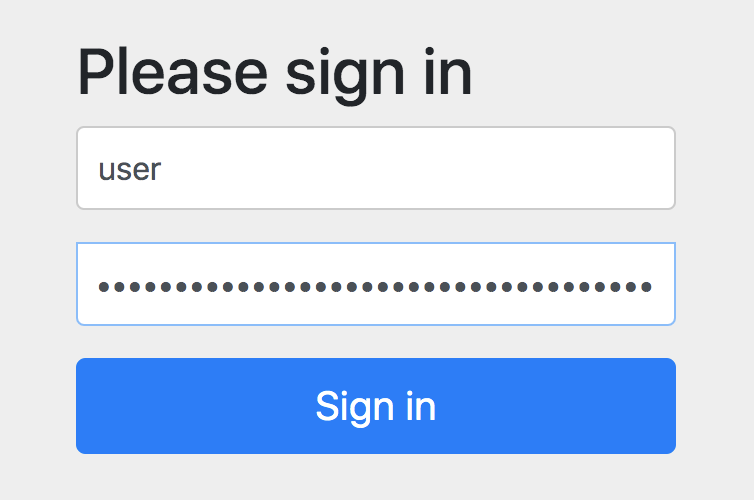
默认所有的资源都是受保护的,会跳转到登录页面http://localhost:8080/login
用户密码默认是 user,密码是控制台生成的。

http://xhope.top/wp-content/uploads/2021/10/login.png

登录之后,自动跳转到index。

Github:https://github.com/jkxyx205/spring-security-learn/tree/zero-config

sharp-common支持HttpMessageConverter对枚举Enum自定义转换

枚举类

StatusEnum code是String类型

@AllArgsConstructor
@Getter
public enum StatusEnum {
    DEFAULT("DEFAULT");

    @JsonValue
    public String getCode() {
        return this.name();
    }

    private final String label;

    public static StatusEnum valueOfCode(String code) {
        return valueOf(code);
    }
}

SexEnum code是int类型

@AllArgsConstructor
@Getter
public enum SexEnum {
    DEFAULT(1, "DEFAULT");

    private static final Map<Integer, SexEnum> codeMap = new HashMap<>();

    static {
        for (SexEnum e : values()) {
            codeMap.put(e.code, e);
        }
    }

    private final int code;

    private final String label;

    @JsonValue
    public int getCode() {
        return this.code;
    }

    public static SexEnum valueOfCode(int code) {
        return codeMap.get(code);
    }
}

枚举中必须包含静态方法 valueOfCode 和 方法 getCode

添加对Enum的转换配置

MvcConfig.java

@Configuration
@AllArgsConstructor
public class MvcConfig implements WebMvcConfigurer {

    private final ObjectMapper objectMapper;

    @Override
    public void addFormatters(FormatterRegistry registry) {
        // 排在前面优先使用 如果没有找到code仍然会尝试NAME。所以SexEnum可以通过1或者DEFAULT去反序列化
        registry.addConverterFactory(new CodeToEnumConverterFactory());
    }

    @PostConstruct
    public void postConstruct() {
        SimpleModule simpleModule = new SimpleModule();
        simpleModule.addDeserializer(Enum.class, new EnumJsonDeserializer());
        objectMapper.registerModule(simpleModule);
    }

}
  • addFormatters方法处理 FormHttpMessageConverter 对Enum的反序列化。如果没有找到code仍然会尝试NAME。所以SexEnum可以通过 1 或者 DEFAULT 去反序列化
  • postConstruct方法处理 MappingJackson2HttpMessageConverter 对Enum的反序列化

User.java

@Data
public class User {

    private SexEnum sex;

    private StatusEnum status;

    private String name;

}

测试

添加API接口

@RestController
public class TestController {

    @GetMapping("/test")
    public User test(@RequestBody User user) {
        System.out.println(user);
        return user;
    }

    @GetMapping("/test1")
    public User test1(User user) {
        System.out.println(user);
        return user;
    }
}

客户端请求

application/json 发起请求,后端 @RequestBody 接收数据

curl -X GET \
  http://127.0.0.1:8080/test \
  -H 'Content-Type: application/json' \
  -d '{
    "status": "DEFAULT",
    "name": "Rick",
    "sex": 1
}'

通过参数的方式发起数据

curl -X GET \
  'http://127.0.0.1:8080/test1?sex=1&status=DEFAULT&name=Rick'

curl -X GET \
  'http://127.0.0.1:8080/test1?sex=DEFAULT&status=DEFAULT&name=Rick'