<?xml version="1.0" ?>
<project name="AntExample1" default="war">

    <path id="compile.classpath">
        <fileset dir="WebContent/WEB-INF/lib">
            <include name="*.jar"/>
        </fileset>
        <fileset dir="D:\develop\jboss-eap-6.2\modules\system\layers\base">
            <include name="**/*.jar"/>
        </fileset>
    </path>

    <target name="init">
        <mkdir dir="build/classes"/>
        <!--拷贝非java文件-->
        <copy includeemptydirs="false" todir="build/classes">
            <fileset dir="src">
                <exclude name="**/*.java"/>
            </fileset>
        </copy>

        <mkdir dir="dist" />
    </target>

    <target name="compile" depends="init" >
        <javac destdir="build/classes" debug="true" encoding="UTF-8">
            <classpath refid="compile.classpath"/>
            <src path="src"/>
        </javac>
    </target>

    <target name="war" depends="compile">
        <war destfile="dist/SpaceMgt_HK.war" webxml="WebContent/WEB-INF/web.xml">
            <fileset dir="WebContent"/>
            <!--<lib dir="WebContent/WEB-INF/lib"/>-->
            <classes dir="build/classes"/>
        </war>
    </target>

    <target name="clean">
        <delete dir="dist" />
        <delete dir="build" />
    </target>

</project>
用Maven分环境打包非Maven项目
现在有一个项目,不是用
maven构建的,想通过maven进行各个环境的打包,比如dev/sit/prd环境jdbc.properties是不相同的。不能破坏原来的目录结构,同时实现以下功能:
1. 多环境打包
2. 结合ant插件清理临时文件,支持war上传FTP
工程目录

修改如下
* 创建文件夹config放置文件jdbc.properties和打包所需要的provided jar
* 添加pom.xml
* bat执行脚本
1 .配置文件目录
config是在项目的一级目录,和src同一级
|-config
|-LOCAL_HK
|-jdbc.properties
|-SIT_HK
|-jdbc.properties
2. pom.xml
<?xml version="1.0" encoding="UTF-8"?>
<project xmlns="http://maven.apache.org/POM/4.0.0" xmlns:xsi="http://www.w3.org/2001/XMLSchema-instance"
    xsi:schemaLocation="http://maven.apache.org/POM/4.0.0 http://maven.apache.org/maven-v4_0_0.xsd">
    <modelVersion>4.0.0</modelVersion>
    <groupId>com.asw.spacemgt</groupId>
    <artifactId>asw</artifactId>
    <version>V1.5.0.${maven.build.timestamp}</version>
    <packaging>war</packaging>
    <name>SpaceMgt</name>

    <properties>
        <maven.build.timestamp.format>yyyyMMdd</maven.build.timestamp.format>
        <!-- 文件拷贝时的编码 -->
        <project.build.sourceEncoding>UTF-8</project.build.sourceEncoding>
        <project.reporting.outputEncoding>UTF-8</project.reporting.outputEncoding>
        <!-- 编译时的编码 -->
        <maven.compiler.encoding>UTF-8</maven.compiler.encoding>
        <!--ftp配置信息 -->
        <ftp.server>172.18.50.126</ftp.server>
        <ftp.userid>alex</ftp.userid>
        <ftp.password>movit123.</ftp.password>
    </properties>

     <build>
        <!-- java code -->
        <sourceDirectory>src</sourceDirectory>

        <resources>
            <resource>
                <!--
                获取资源文件
                *.hbm.xml
                *.properties

                排除java文件+要替换的文件
                -->
                <directory>src</directory>
                <excludes>
                    <exclude>**/jdbc.properties</exclude>
                    <exclude>**/space.properties</exclude>
                    <exclude>**/*.java</exclude>
                </excludes>
            </resource>
            <resource>
                <!--执行文件替换-->
                <directory>config/${env}</directory>
                <targetPath>resource</targetPath>
            </resource>
        </resources>

        <plugins>
            <plugin>
                <groupId>org.apache.maven.plugins</groupId>
                <artifactId>maven-surefire-plugin</artifactId>
                <configuration>
                    <skip>true</skip>
                </configuration>
            </plugin>
            <plugin>
                <groupId>org.apache.maven.plugins</groupId>
                <artifactId>maven-compiler-plugin</artifactId>
                <configuration>
                    <source>1.7</source>
                    <target>1.7</target>
                    <encoding>UTF-8</encoding>
                    <compilerArguments>
                        <!--本地jar-->
                        <extdirs>WebContent\WEB-INF\lib</extdirs>
                    </compilerArguments>
                </configuration>
            </plugin>
            <plugin>
                <groupId>org.apache.maven.plugins</groupId>
                <artifactId>maven-war-plugin</artifactId>
                <configuration>
                    <webResources>
                        <resource>
                            <!--web app位置-->
                            <directory>WebContent</directory>
                        </resource>
                    </webResources>

                    <webXml>WebContent\WEB-INF\web.xml</webXml>
                </configuration>
            </plugin>
            <plugin>
               <artifactId>maven-antrun-plugin</artifactId>
               <version>1.7</version>
               <executions>
                    <execution>
                               <id>default-cli</id>
                               <goals>
                                     <goal>run</goal>
                               </goals>
                               <configuration>
                                    <target>
                                        <!--删除maven打包产生的临时目录-->
                                        <delete includeemptydirs="true">
                                            <fileset dir="deploy" >
                                                <exclude name="${maven.build.timestamp}/**/*.war"/>
                                            </fileset>
                                        </delete>
                                         <!--通过ftp创建文件夹-->
                                        <ftp server="${ftp.server}" userid="${ftp.userid}" password="${ftp.password}" action="mkdir" remotedir="/Space/war/sit/${maven.build.timestamp}"></ftp>
                                        <!--上传到FTP-->
                                        <ftp server="${ftp.server}" action="put" passive="true" remotedir="/Space/war/sit/${maven.build.timestamp}" userid="${ftp.userid}"
                                        password="${ftp.password}"  separator="/" verbose="yes" binary="yes">
                                             <fileset dir="deploy/${maven.build.timestamp}/SIT">
                                             </fileset>
                                         </ftp>
                                    </target>
                               </configuration>
                    </execution>
                </executions>
                <!--上传ftp依赖的jar-->
                <dependencies>
                     <dependency>
                        <groupId>commons-net</groupId>
                        <artifactId>commons-net</artifactId>
                        <version>3.3</version>
                        <scope>system</scope>
                        <systemPath>${project.basedir}/config/lib/commons-net-3.3.jar</systemPath>
                     </dependency>
                     <dependency>
                        <groupId>org.apache.ant</groupId>
                        <artifactId>ant-commons-net</artifactId>
                        <version>1.0</version>
                        <scope>system</scope>
                        <systemPath>${project.basedir}/config/lib/ant-commons-net.jar</systemPath>
                     </dependency>
                </dependencies>
            </plugin>
        </plugins>
    </build>

    <profiles>
        <profile>
            <id>LOCAL_HK</id>
            <properties>
                <env>LOCAL_HK</env>
                <buCode>HK</buCode>
            </properties>
            <build>
                <finalName>SpaceMgt_${buCode}</finalName>
                <directory>deploy/${maven.build.timestamp}/LOCAL</directory>
            </build>
        </profile>
        <profile>
            <id>SIT_HK</id>
            <properties>
                <env>SIT_HK</env>
                <buCode>HK</buCode>
            </properties>
            <build>
                <finalName>SpaceMgt_${buCode}</finalName>
                <directory>deploy/${maven.build.timestamp}/SIT</directory>
            </build>
        </profile>
    </profiles>

    <dependencies>
        <!-- lib不存在javax相关jar,编译期使用,不会打到war中 -->
        <dependency>
            <groupId>jboss</groupId>
            <artifactId>servlet</artifactId>
            <version>1.0</version>
            <scope>system</scope>
            <systemPath>${project.basedir}/config/lib/jboss-servlet-api_3.0_spec-1.0.2.Final-redhat-1.jar</systemPath>
        </dependency>
        <dependency>
            <groupId>jboss</groupId>
            <artifactId>jsp</artifactId>
            <version>1.0</version>
            <scope>system</scope>
            <systemPath>${project.basedir}/config/lib/jboss-jsp-api_2.2_spec-1.0.1.Final-redhat-2.jar</systemPath>
        </dependency>
        <dependency>
            <groupId>jboss</groupId>
            <artifactId>jstl</artifactId>
            <version>1.0</version>
            <scope>system</scope>
            <systemPath>${project.basedir}/config/lib/jboss-jstl-api_1.2_spec-1.0.3.Final-redhat-2.jar</systemPath>
        </dependency>
    </dependencies>
</project>
3. bat脚本
编写bat脚本build.bat
@echo build war
call mvn package -PLOCAL_HK
call mvn package -PSIT_HK
call mvn antrun:run
双击build.bat文件会在deploy文件下分目录产生,同时上传FTP。
最终目录结构:
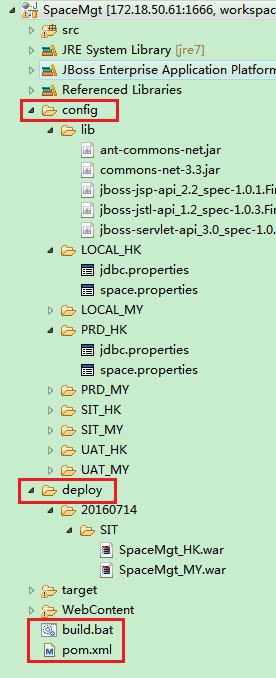
相关链接:
获取FTP文件最后修改时间
-
如果FTP server和Web Server同一个时区
使用方法org.apache.commons.net.ftp.FTPClient#getModificationTimepublic String getModificationTime(String pathname)
throws IOException
Issue the FTP MDTM command (not supported by all servers) to retrieve the last modification time of a file. The modification string should be in the ISO 3077 form “YYYYMMDDhhmmss(.xxx)?”. The timestamp represented should also be in GMT, but not all FTP servers honour this.
Parameters:
pathname – The file path to query.
Returns:
A string representing the last file modification time in YYYYMMDDhhmmss format.
Throws:
IOException – if an I/O error occurs.
Since:
2.0该函数会获取
GMT时间,格式为:213 20160125035757。这时间和北京时间会差8个小时。按空格拆分字符串后使用如下方法获取北京时间20160125115757,主要是格式化添加时区sdf.setTimeZone(TimeZone.getTimeZone("GMT")),而不能按照默认的北京时间。因为FTP server和Web Server同一个时区,所以时间是一致的。
public static long getLongFromGMTDateString(String gmtDate, String format) throws Exception {
        SimpleDateFormat sdf = new SimpleDateFormat(format);
        sdf.setTimeZone(TimeZone.getTimeZone("GMT")); //默认就是系统设置时区
        Date date = sdf.parse(gmtDate);
        return date.getTime();   // Unix时间戳
}
-
如果FTP server和Web Server不在同一个时区
需要结合另外第一个方法org.apache.commons.net.ftp.FTPFile#getModificationTimepublic Calendar getTimestamp()
Returns the file timestamp. This usually the last modification time.
Returns:
A Calendar instance representing the file timestamp.这可以获取FTP时区的的最后修改时间,但是没有秒,结合方法
getModificationTime获取秒,拼接起来就可以获取完整的FPT文件最后修改时间。
常识
- Unix时间戳 1453694277000
->北京时间 2016/1/25 11:57:57
-> GMT 2016/1/25 03:57:57 - GMT –>北京时间
GMT-> Unix时间戳 -> 北京时间
【心理/精神病?】《天才在左 疯子在右》
基本信息:
书名:天才在左 疯子在右
作者:高铭
出版社:北京联合出版公司出版 2016年1月
ISBN 978-7-5502-6393-2
<ps:这本书没看完,因为感觉到有点压抑,虽然在很多人看来比较好笑,嘲笑的笑,嘲笑作者的无知,嘲笑情节俗套。>
知乎里对这本书的评价比较全面,既然看不下去,也就不想多说了。这类的书,我怕是无缘了,或许是过于接近心理层面的思考,太孤独冷清了。
【社会万象】《莫泊桑 社会小说》
基本信息:
书名:莫泊桑 社会小说
作者:莫泊桑(法国)
译者:郭宏安
出版社:上海文艺出版社 2012年4月第一版
ISBN 978-7-5321-4369-6/I·3384
丛书:新文艺 外国文学大师读本
<听说的关于莫泊桑的简评>所谓“迷人”,指的是阅读时的愉悦,思考时的痛苦,因为莫泊桑的小说世界是一个痛苦多,欢乐少,笼罩着一片悲观主义的凉雾世界。“其境过清,不可久居”,久居则有“凄神寒骨”之虞。
1.羊脂球
羊脂球一直在哭,有时候在两节歌声之间,黑暗里送出一声呜咽,那是她没能忍住的一声悲啼。
2.菲菲小姐
3.两个朋友
“只要世界上还有政府,这种情况就永远不会改变。”
“有了国王,我们就要同外国打仗;有了共和国,我们就要打内仗。”
人类永远不能得到自由。
4.索瓦热老婆婆
简介:一位老婆婆和四位敌国兵的爱恨交织,结局是老婆婆在得知自己的儿子死在战场之后,决心烧死在自己家里居住的四位年轻的敌国的士兵。故事发生在老婆婆居住的村子被敌军占领之后。
一种失之交臂的幸福感觉。
因为乡下人米有什么爱国心激起的仇恨;那只有上层阶级的人才有。
“为了报复,德国人才把我的那座城堡毁掉。”可是我这时候却在想那四个烧死在这座茅屋里的善良的小伙子的母亲,想另一位被杀在这堵墙边的母亲的残忍的英勇行为。我捡起来一块小石头,上面还留着被火燎过的黑颜色。
5.我的叔叔于勒
……这个可怜的人,这时候总做出一个手势,叫我看了心里十分难过。他总是张开了手摸一下额头,好像要抹去根本不存在的汗珠,并且总是一句话也不回答。
行为的好坏,只有结果才能决定。
在有钱人的家里,一个人吃喝玩乐,无非算是糊涂荒唐。大家笑嘻嘻地称呼他一声花花公子。在生活困难的家庭里,一个人要是逼得父母动老本,那他就是一个坏蛋,一个流氓,一个无赖了。<ps:这句话被一位朋友反驳:这句话有偷换概念之嫌,因为在有钱人的家里,一个人要是逼得父母动老本,那他就是败家子,不仅仅是糊涂荒唐这么简单了。>
6.项链
<关于虚荣>她很虚荣,但是她很美丽;她快乐地忘乎所以,也彬彬有礼。可她为什么选择了他?害了自己,也害了他。>现实中有种生活叫“门当户对”,也有蒂凡尼的早餐。
7.图瓦
“怎么样,图瓦老爹,红焖第一口鸡的时候可得请我啊,请不请?” “当然得请你,我的姑爷。” (图瓦老爹喜欢见谁都叫姑爷,这鸡是图瓦老爹自己在被子里孵出来的,他就像这些小鸡的母亲)
8.港口
9.上校的意义
10.模特儿
画家在妻子的车旁默默走着,一小时以来,他们之间连一句话也没有交谈过。<错误>

<完>