Nodejs + Express + EJS搭建带有母版的网站

通过nodejs express ejs ejs-mate 搭建具有母版页面的网站页面,省略nodejs的安装过程。

Express

  • 安装Express
$ npm install express --save
  • Express 应用生成器搭建网站
$ npm install express-generator -g
$ express myapp
$ cd myapp 
$ npm install
$ DEBUG=myapp npm start

后在浏览器中打开 http://localhost:3000/ 网址就可以看到这个应用了。注意这时默认的模版引擎是jade。需要做相应的修改才能支持ejs
通过 Express 应用生成器创建的应用一般都有如下目录结构:

.
├── app.js
├── bin
│   └── www
├── package.json
├── public
│   ├── images
│   ├── javascripts
│   └── stylesheets
│   └── style.css
├── routes
│   ├── index.js
│   └── users.js
└── views
├── error.jade
├── index.jade
└── layout.jade

7 directories, 9 files

EJS & ejs-mate

  • 安装
$ npm install ejs
$ npm install ejs-mate --save
  • 修改文件app.js,使用母版引擎ejs
var engine = require('ejs-mate');
app.engine('ejs', engine);
app.set('view engine', 'ejs');
  • 添加模版文件layout.ejs
<!DOCTYPE html>
<html>
  <head>
    <title>It's <%= who %></title>
  </head>
  <body>
    <section>
      <%- body -%>
    </section>
  </body>
</html>
  • index.ejs使用母版文件
<% layout('layout') -%>
<h1>I am the <%= what %> template</h1>
  • Express4.0 渲染
var express = require('express'),
  engine = require('ejs-mate'),
  app = express();

// use ejs-locals for all ejs templates:
app.engine('ejs', engine);

app.set('views',__dirname + '/views');
app.set('view engine', 'ejs'); // so you can render('index')

// render 'index' into 'boilerplate':
app.get('/',function(req,res,next){
  res.render('index', { what: 'best', who: 'me' });
});

app.listen(3000);

渲染后将会得到代码

<!DOCTYPE html>
<html>
  <head>
    <title>It's me</title>
  </head>
  <body>
    <section>
      <h1>I am the best template</h1>
    </section>
  </body>
</html>

参考链接
www.expressjs.com.cn/
http://www.embeddedjs.com/
https://github.com/JacksonTian/ejs-mate

富文本编辑器CKEditor使用

1. 下载

下载地址: http://ckeditor.com/download

下载分为2种

  • 直接下载

    • Basic Package
    • Standard Package(默认)
    • Full Package
  • 手动配置

    • Customize

我觉得手动配置插件Enhanced Image,上传图片是非常实用的。

2. 学习使用编辑器

文件下载完成后,打开路径samples/index,查看demo

  • 学习CKEditor使用
CKEDITOR.editorConfig = function( config ) {

    config.toolbarGroups = [
                            { name: 'document', groups: [ 'mode', 'document', 'doctools' ] },
                            { name: 'clipboard', groups: [ 'clipboard', 'undo' ] },
                            { name: 'editing', groups: [ 'find', 'selection', 'spellchecker', 'editing' ] },
                            { name: 'forms', groups: [ 'forms' ] },
                            { name: 'basicstyles', groups: [ 'basicstyles', 'cleanup' ] },
                            { name: 'paragraph', groups: [ 'list', 'indent', 'blocks', 'align', 'bidi', 'paragraph' ] },
                            { name: 'styles', groups: [ 'styles' ] },
                            { name: 'colors', groups: [ 'colors' ] },
                            { name: 'insert', groups: [ 'insert' ] },
                            { name: 'links', groups: [ 'links' ] },
                            { name: 'tools', groups: [ 'tools' ] },
                            { name: 'others', groups: [ 'others' ] },
                            { name: 'about', groups: [ 'about' ] }
                        ];

                        config.removeButtons = 'Save,NewPage,Cut,Copy,Find,Replace,SelectAll,Form,Checkbox,Radio,TextField,Textarea,Select,Button,HiddenField,About,ShowBlocks,Language,Flash,Iframe,Scayt,Superscript,Subscript';


    config.filebrowserImageUploadUrl= ctx+"ckeditor/uploadImg"; //待会要上传的action或servlet
};

页面

<textarea id="contentForm-content" name="content"></textarea>

样式和事件

CKEDITOR.replace('contentForm-content', {
            height : 200
        });


        CKEDITOR.instances["contentForm-content"].on("instanceReady", function () {  
            //set keyup event  
            this.document.on("keyup", function() {


            });  

        });  
  • TOOLBAR CONFIGURATOR,右上角点击可以配置显示

3. 自定义插件

如果添加文件上传插件,插件的名字叫file
目录结构如下:
http://xhope.top/wp-content/uploads/2017/03/2.png

a. 创建目录 ckeditor\plugins\file
b. 创建文件plugin.js

/**
 * @license Copyright (c) 2003-2015, CKSource - Frederico Knabben. All rights reserved.
 * For licensing, see LICENSE.md or http://ckeditor.com/license
 */

/**
 * @fileOverview File plugin
 */

( function() {
    CKEDITOR.plugins.add('file',  
            {         
                requires : ['dialog'],  
                icons: 'file', // %REMOVE_LINE_CORE%
                init : function (editor)  
                {  
                    var pluginName = 'file';  

                    //加载自定义窗口,就是dialogs前面的那个/让我纠结了很长时间  
                    CKEDITOR.dialog.add(pluginName,this.path + "/dialogs/file.js");  

                    //给自定义插件注册一个调用命令  
                    editor.addCommand( pluginName, new CKEDITOR.dialogCommand( pluginName ) );  
                    //注册一个按钮,来调用自定义插件  
                    editor.ui.addButton('File',  
                            {  
                                //editor.lang.mine是我在zh-cn.js中定义的一个中文项,  
                                //这里可以直接写英文字符,不过要想显示中文就得修改zh-cn.js  
                                label : '上传附件',  
                                command : pluginName,
                                toolbar:"insert,25" 
                            });  
                }  
            }  
        );  

} )();

c. 创建文件file.js

( function() {
    CKEDITOR.dialog.add( 'file', function( editor )  
            {  
                return {   
                    title : '附件上传',  
                    minWidth : 600,  
                    minHeight : 200,  
                    contents : [  
                        {  
                            elements :  
                            [  
                                {  
                                    type : 'html',
                                    html : '<input type="file" id="upload" name="upload" multiple/><div id="fileList" style="padding:2px;height:200px; border:1px solid #BCBCBC; margin-top:5px; overflow:auto;">\
                                         </div>'
                                }  
                            ]  
                        }  
                    ],
                    onLoad:function() {
                        $('#upload').fileupload({
                            url: ""+ctx+"ckeditor/uploadFile",
                            dataType: 'json',
                            done: function (e, data) {
                                $.each(data.result, function (index, file) {
                                    var a = "<span><img style='position:relative;top:3px;' src=\""+ctx+"static/images/"+common.getImage(1,file.name)+"\"/><a style='margin-left:2px;' href=\"javascript:void(0)\" onclick=\"common.postSubmit('"+(file.downloadUrl+"&fileName="+file.name+"")+"');\">"+file.name+"</a>&nbsp;<span style='font-weight:normal;color:#BCBCBC;font-size:11px;'>"+common.getFileSize(file.size)+"</span>" +
                                            "\<a class='delClass' style='color:#3D5E86;margin-left:5px;' href='javascript:void(0);' onclick=\"$(this).parent().remove();\">删除</a></span><br/>";
                                    $("#fileList").append(a);
                                }); 
                            } 
                        }).prop('disabled', !$.support.fileInput)
                            .parent().addClass($.support.fileInput ? undefined : 'disabled');

                        $("#fileList").niceScroll({cursorcolor:"#BCBCBC"}); // First scrollable DIV
                    },
                    onShow:function() {
                         $('#upload').val('');  
                         $("#fileList").html('');
                    },
                    onOk: function() {
                        $("#fileList a.delClass").remove();
                        $("#fileList a.delClass").next().remove();
                        editor.insertHtml($("#fileList").html());
                    }
                };  
            } );  
} )();

d. icons目录下放入图标file.png
e. 使用插件

//自定义插件,上传附件
    config.extraPlugins = 'file';

使用效果
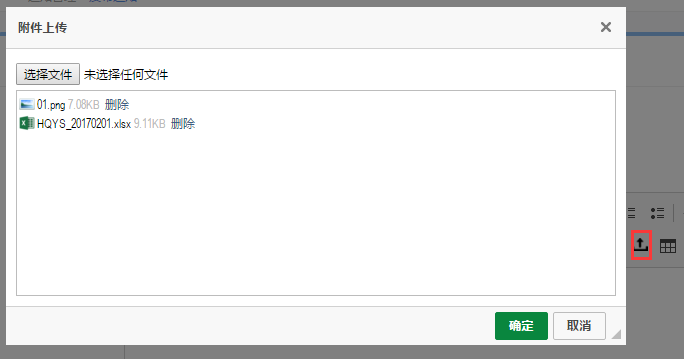
http://xhope.top/wp-content/uploads/2017/03/1.png

4.注意点

你保存正文后显示,如果你在设计页面的时候用了重置样式,那么富文本编辑器内容显示会受到影响。要么取消重置样式,要么单独将重置的样式还原回来。我非常痛苦地选择了后者。

nginx 80端口根据不同域名转发到不同端口

现在有一个外网服务器地址:121.42.151.190

绑定两个二级域名:

  • botao.xhope.top
  • richtech.xhop.top

这两个程序部署的端口为8080 8081
如果不使用nginx,可能需要这么访问:

问题来了,如何才能做到访问,即使不显示地加端口,也能寻找。

按照如下配置

1.安装nginx,windows下载地址http://nginx.org/en/download.html
2.配置nginx.conf

server {
        listen       80;
        server_name  botao.xhope.top;
        location / {
            proxy_pass   http://127.0.0.1:8080/;
        }
    }

server {
        listen       80;
        server_name  richtech.xhope.top;
        location / {
            proxy_pass   http://127.0.0.1:8081/;
        }
    }

3.运行nginx

nginx

4.关闭nginx

    nginx -s stop

springboot–jpa03

pom.xml

<dependency>
            <groupId>org.springframework.boot</groupId>
            <artifactId>spring-boot-starter-data-jpa</artifactId>
        </dependency>

        <dependency>
            <groupId>mysql</groupId>
            <artifactId>mysql-connector-java</artifactId>
        </dependency>

application.yml

spring:
  datasource:
    driver-class-name: com.mysql.jdbc.Driver
    url: jdbc:mysql://127.0.0.1:3306/nc
    username: root
    password: root
  jpa:
    hibernate:
      ddl-auto: update
    show-sql: true

实体类Girl.java

package com.rick;

import javax.persistence.Entity;
import javax.persistence.GeneratedValue;
import javax.persistence.Id;

/**
 * Created by rick on 2017/1/10.
 */
@Entity
public class Girl {
    @Id
    @GeneratedValue
    private Integer id;

    private String cupSize;

    private Integer age;

    public Girl() {
    }

    public Integer getId() {
        return id;
    }

    public void setId(Integer id) {
        this.id = id;
    }

    public String getCupSize() {
        return cupSize;
    }

    public void setCupSize(String cupSize) {
        this.cupSize = cupSize;
    }

    public Integer getAge() {
        return age;
    }

    public void setAge(Integer age) {
        this.age = age;
    }
}

daoGirlRepository.java自动被spring管理

package com.rick;

import org.springframework.data.jpa.repository.JpaRepository;

/**
 * Created by rick on 2017/1/10.
 */
public interface GirlRepository extends JpaRepository<Girl, Integer> {
}

service GirlService.java

package com.rick;

import org.springframework.stereotype.Service;

import javax.annotation.Resource;
import javax.transaction.Transactional;

/**
 * Created by rick on 2017/1/10.
 */
@Service
public class GirlService {
    @Resource
    GirlRepository girlRepository;

    @Transactional //方法纳入事务
    public void addTwoGirls() {
        Girl girl1 = new Girl();
        girl1.setAge(11);
        girl1.setCupSize("A");
        girlRepository.save(girl1);

        Girl girl2 = new Girl();
        girl2.setAge(30);
        girl2.setCupSize("G");
        girlRepository.save(girl2);

    }
}

JpaRepository中的其他方法:

* java.util.List<T> findAll();
* java.util.List<T> findAll(org.springframework.data.domain.Sort sort);
* java.util.List<T> findAll(java.lang.Iterable<ID> iterable);
* <S extends T> java.util.List<S> save(java.lang.Iterable<S> iterable);
* void flush();
* <S extends T> S saveAndFlush(S s);
* void deleteInBatch(java.lang.Iterable<T> iterable);
* void deleteAllInBatch();
* T getOne(ID id);
* <S extends T> java.util.List<S> findAll(org.springframework.data.domain.Example<S> example);
* <S extends T> java.util.List<S> findAll(org.springframework.data.domain.Example<S> example, org.springframework.data.domain.Sort sort);

springboot–属性配置02

spring默认的属性配置文件是:application.propertity
推荐使用application.yml

server:
  port: 8080
cupSize: F
girl:
  cupSize: G
  age: 22

GirlProperty.java

package com.rick;

import org.springframework.boot.context.properties.ConfigurationProperties;
import org.springframework.stereotype.Component;

/**
 * Created by rick on 2017/1/10.
 */

@ConfigurationProperties(prefix = "girl")
@Component
public class GirlProperty {

    private Integer age;

    private String cupSize;

    public Integer getAge() {
        return age;
    }

    public void setAge(Integer age) {
        this.age = age;
    }

    public String getCupSize() {
        return cupSize;
    }

    public void setCupSize(String cupSize) {
        this.cupSize = cupSize;
    }
}

属性使用HelloController.java

package com.rick;

import org.springframework.beans.factory.annotation.Value;
import org.springframework.web.bind.annotation.RequestMapping;
import org.springframework.web.bind.annotation.RequestMethod;
import org.springframework.web.bind.annotation.RestController;

import javax.annotation.Resource;

/**
 * Created by rick on 2017/1/10.
 */

@RestController
public class HelloController {

    @Value("${cupSize}")
    private String cupSize;

    @Resource
    private GirlProperty girlProperty;

    @RequestMapping(value="/hello", method = RequestMethod.GET)
    public String sayHello() {        
        return girlProperty.getCupSize() + "=>" + girlProperty.getAge();

}