springboot–第一个springboot应用01

简介

spring-boot是由Pivotal团队提供的全新框架,其设计目的是用来简化新Spring应用的初始搭建以及开发过程。该框架使用了特定的方式来进行配置,从而使开发人员不再需要定义样板化的配置。通过这种方式,Boot致力于在蓬勃发展的快速应用开发领域(rapid application development)成为领导者

创建第一个springboot应用

工具:

  • idea2016
  • jdk:1.8
  • maven:3.3.9

idea2016快速创建springboot应用

操作步骤:创建Project/Spring Initializr/Web/Web

自动生成文件如下:

pom.xml

<?xml version="1.0" encoding="UTF-8"?>
<project xmlns="http://maven.apache.org/POM/4.0.0" xmlns:xsi="http://www.w3.org/2001/XMLSchema-instance"
    xsi:schemaLocation="http://maven.apache.org/POM/4.0.0 http://maven.apache.org/xsd/maven-4.0.0.xsd">
    <modelVersion>4.0.0</modelVersion>

    <groupId>com.rick</groupId>
    <artifactId>girl</artifactId>
    <version>0.0.1-SNAPSHOT</version>
    <packaging>jar</packaging>

    <name>girl</name>
    <description>Demo project for Spring Boot</description>

    <parent>
        <groupId>org.springframework.boot</groupId>
        <artifactId>spring-boot-starter-parent</artifactId>
        <version>1.4.3.RELEASE</version>
        <relativePath/> <!-- lookup parent from repository -->
    </parent>

    <properties>
        <project.build.sourceEncoding>UTF-8</project.build.sourceEncoding>
        <project.reporting.outputEncoding>UTF-8</project.reporting.outputEncoding>
        <java.version>1.8</java.version>
    </properties>

    <dependencies>
        <dependency>
            <groupId>org.springframework.boot</groupId>
            <artifactId>spring-boot-starter-web</artifactId>
        </dependency>
        <dependency>
            <groupId>org.springframework.boot</groupId>
            <artifactId>spring-boot-starter-test</artifactId>
            <scope>test</scope>
        </dependency>
    </dependencies>

    <build>
        <plugins>
            <plugin>
                <groupId>org.springframework.boot</groupId>
                <artifactId>spring-boot-maven-plugin</artifactId>
            </plugin>
        </plugins>
    </build>


</project>

GirlApplication.java

package com.rick;

import org.springframework.boot.SpringApplication;
import org.springframework.boot.autoconfigure.SpringBootApplication;

@SpringBootApplication
public class GirlApplication {

    public static void main(String[] args) {
        SpringApplication.run(GirlApplication.class, args);
    }
}

HelloController.java

package com.rick;

import org.springframework.web.bind.annotation.RequestMapping;
import org.springframework.web.bind.annotation.RequestMethod;
import org.springframework.web.bind.annotation.RestController;

import javax.annotation.Resource;

/**
 * Created by rick on 2017/1/10.
 */

@RestController
public class HelloController {


    @RequestMapping(value="/hello", method = RequestMethod.GET)
    public String sayHello() {
        return "Hello SpringBoot";
    }

}

启动应用,访问:http://localhost:8080/hello
学习网站:http://www.imooc.com/learn/767
vue插件开发

插件MyPlugin.js

module.exports = (function() {
  var install = function install(Vue) {
       if (install.installed) return;

         // 1. 添加全局方法或属性
        Vue.myGlobalMethod = function () {
          // 逻辑...
        }
        // 2. 添加全局资源
        Vue.directive('my-directive', {
          bind (el, binding, vnode, oldVnode) {
            // 逻辑...
            el.innerHTML = 'DDDD'

          }
        })
        // 3. 注入组件
        Vue.mixin({
          created: function () {
            // 逻辑...
          }
        })
        // 4. 添加事例方法
        Vue.prototype.$myMethod = function (options) {
          // 逻辑...
        }
  }

  return install;

})()

调用main.js

import Vue from 'vue'
import App from './App.vue'
import MyPlugin from './MyPlugin'

Vue.use(MyPlugin)

var vm = new Vue({
  el: '#app',
  render: h => h(App)
})

Vue组件App.vue

<template>
  <div id="app">
     <div v-my-directive></div>
  </div>
</template>

<script>
export default {
    data() {
        return {
        }
    },
    methods: {

    },
    mounted: function() {

    }
}
</script>

参考网站
https://cn.vuejs.org/v2/guide/plugins.html

vue组件开发

创建组件rate.vue

<template lang="html">
   <li>{{message}}</li>
</template>

<script>

export default {
  name: 'vb-rate',
  props:['message'],
  methods: {
  }
}
</script>

使用组件

有两种方式,全局注册和局部注册

全局注册:

main.js

import Vue from 'vue'
import App from './App.vue'

import Rate from './components/rate/rate.vue'

Vue.component(Rate.name, Rate); //全局注册组件


new Vue({
  el: '#app',
  render: h => h(App)
})

App.vue.js

<template>
  <div id="app">
    <!--使用全局注册,直接使用-->
    <ol>
      <vb-rate v-for="item in groceryList" :message="item.text"></vb-rate>
      <vb-rate message="Rick"></vb-rate>
    </ol>

  </div>
</template>

<script>

import Rate from './components/rate/rate.vue' //

export default {
  data () {
    return {
      groceryList: [
            { text: 'Vegetables' },
            { text: 'Cheese' },
            { text: 'Whatever else humans are supposed to eat' }
          ]
    }
  }
}
</script>

局部注册

main.js

import Vue from 'vue'
import App from './App.vue'

new Vue({
  el: '#app',
  render: h => h(App)
})
<template>
  <div id="app">
    <!--使用局部注册-->
    <ol>
      <vb-rate v-for="item in groceryList" :message="item.text"></vb-rate>
      <vb-rate message="Rick"></vb-rate>
    </ol>

  </div>
</template>

<script>

import Rate from './components/rate/rate.vue' //

export default {
  data () {
    return {
      groceryList: [
            { text: 'Vegetables' },
            { text: 'Cheese' },
            { text: 'Whatever else humans are supposed to eat' }
          ]
    }
  },
  components: {
    [Rate.name] : Rate// 局部注册组件
  }
}
</script>

这个地方有个注意点:

<vb-rate :message="item.text"></vb-rate>
<vb-rate message="Rick"></vb-rate>
message有`:`表示vue变量,没有`:`表示字符串

MyBatis Generator使用

MyBatis Generator有很多方式:命令行、ant、java、maven、eclipse。
我采用的是命令行的方式。
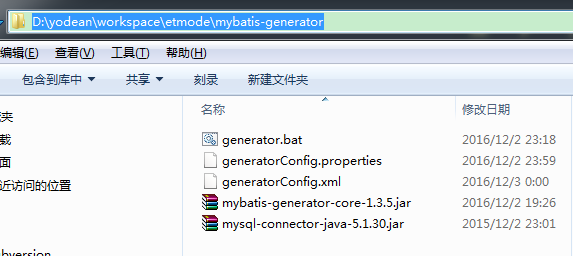
文件列表:
http://xhope.top/wp-content/uploads/2016/12/1.png
generatorConfig.properties

# 包路径配置 
model.package=com.koldoh.etmode.modules.test.entity
xml.mapper.package=mappings.modules.test
dao.package=com.koldoh.etmode.modules.test.dao

table.name=t_test
domainObjectName=MyTest

generatorConfig.xml

<?xml version="1.0" encoding="UTF-8"?>
<!DOCTYPE generatorConfiguration
  PUBLIC "-//mybatis.org//DTD MyBatis Generator Configuration 1.0//EN"
  "http://mybatis.org/dtd/mybatis-generator-config_1_0.dtd">

<generatorConfiguration>
    <properties url="file:///D:/yodean/workspace/etmode/mybatis-generator/generatorConfig.properties" />
    <classPathEntry
            location="D:/yodean/workspace/etmode/mybatis-generator/mysql-connector-java-5.1.30.jar"/>
    <context id="my" targetRuntime="MyBatis3">
        <commentGenerator>
            <property name="suppressDate" value="false"/>
            <property name="suppressAllComments" value="true"/>
        </commentGenerator>

        <jdbcConnection driverClass="com.mysql.jdbc.Driver"
                        connectionURL="jdbc:mysql://localhost:3306/etmode?useUnicode=true" userId="root"
                        password="xxxxxx"/>


        <javaModelGenerator targetPackage="${model.package}"
                            targetProject="D:/yodean/workspace/etmode/src/main/java">
            <property name="enableSubPackages" value="true"/>
            <property name="trimStrings" value="true"/>
        </javaModelGenerator>

        <sqlMapGenerator targetPackage="${xml.mapper.package}"
                         targetProject="D:/yodean/workspace/etmode/src/main/resources">
            <property name="enableSubPackages" value="true"/>
        </sqlMapGenerator>

        <javaClientGenerator targetPackage="${dao.package}"
                             targetProject="D:/yodean/workspace/etmode/src/main/java" type="XMLMAPPER">
            <property name="enableSubPackages" value="true"/>
        </javaClientGenerator>

        <table tableName="${table.name}" domainObjectName="${domainObjectName}"
               enableCountByExample="false" enableUpdateByExample="false"
               enableDeleteByExample="false" enableSelectByExample="false"
               selectByExampleQueryId="false">
        </table>

    </context>
</generatorConfiguration>

generator.bat

java -jar mybatis-generator-core-1.3.5.jar -configfile generatorConfig.xml -overwrite
pause

最后别忘了建表t_test.sql

DROP TABLE IF EXISTS `t_test`;
CREATE TABLE `t_test` (
  `id` int(255) NOT NULL AUTO_INCREMENT,
  `title` varchar(255) DEFAULT NULL,
  `user_name` datetime DEFAULT NULL,
  PRIMARY KEY (`id`)
) ENGINE=InnoDB AUTO_INCREMENT=2 DEFAULT CHARSET=utf8;

参考资料:
http://www.mybatis.org/generator/
http://www.cnblogs.com/pixy/p/5038275.html
http://www.voidcn.com/blog/tianwei7518/article/p-6329286.html
http://bbs.520it.com/forum.php?mod=viewthread&tid=266

Compass模块使用

学习Sass,就是学习语法,学习Compass就是在用库的。使用compass,就是在使用compass给我们提供的库:variables,mixins,functions。
犹如JavaScript之于jQuery

Compass介绍

compass有以下模块:

  • Browser Support

    设置对浏览器的支持情况,$supported-browsers列出所有你想支持的浏览器,$browser-minimum-versions,支持浏览器的最低版本。

  • CSS3

封装了CSS3的mixin。主要子模块有:Appearance、Background Clip、Background Origin、Background Size、Border Radius、Box、Box Shadow、Box Sizing、CSS 、Regions、CSS3 Pie、Columns、Filter、Flexbox、Font Face、Hyphenation、Images
、Inline Block、Opacity、Selection、Shared Utilities、Text Shadow、Transform
、Transition、User Interface

  • Helpers
    函数库

  • Layout
    布局相关的

  • Reset
    样式重置

@import "compass/reset";

这样所有的样式都被重置了,等价引用

@import "compass/reset/utilities";
global-reset();

作为一个有极客精神的人,如果不想重置所有样式,按需重置,怎么处理?
通过mixin函数就可以做到。

@import "compass/reset/utilities";
nested-reset();
reset-box-model();
reset-table();
reset-html5();
...
  • Typography
    文本布局相关,Links链接样式;Lists列表样式;Text 文字显示;
    Vertical Rhythm 设置行高;
  • Utilities
    其他mixin

Compass插件normalize使用

1 . 安装插件

gem install compass-normalize

2 . 使用插件

  • config.rb添加引用
require 'compass-normailze'
  • css文件调用

a. 重置所有样式

@import "normalize"; //重置所有样式

b. 按需重置

@import "normalize-version";
@import "normalize/base";
@import "normalize/html5";
@import "normalize/links";

参照网站:
http://xhope.top/?p=893
http://compass-style.org/reference/compass/